 ForwardMsg
كيفية الحصول على معرّف محادثة تيليجرام
احصل على معرّف المحادثة التي ستُرسل إليها الرسائل.
🔴 شاهد شرح الفيديو 🎥
الحصول على معرّف محادثة تيليجرام
الطريقة 1 - استخدام روبوت Telegram
Recommended: This is the easiest way to get any chat ID.
You can easily obtain the chat ID of a user, group, or channel by forwarding a message to one of these Telegram bots:
Simply forward a message from the target user, group, or channel to one of these bots, and it will return the corresponding chat ID.
Note: If you are using Telegram Web and the bot shows disabled buttons, please switch to the Telegram mobile app or desktop app. The buttons work correctly there.
الطريقة 2 - استخراج معرّف المحادثة من رابط رسالة
If you have a message link, you can extract the chat ID manually:
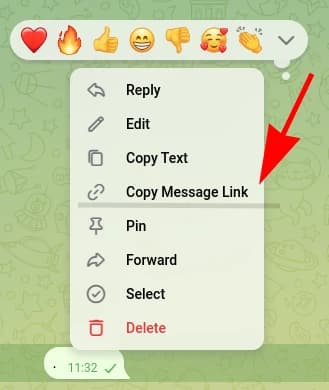
Private Groups and Channels
Private groups and channels use links that contain /c/:
https://t.me/c/123456789/42-
The numbers after
/c/represent the group or channel ID (e.g.,123456789). -
Important: For supergroups (groups with topics) and channels, you must add
-100in front of the number.Example: if the link shows
123456789, your chat ID is-100123456789. -
Extract the topic ID (if available):
https://t.me/c/123456789/12/987- The number in the middle of the URL (e.g.,
12) represents the topic ID.
- The number in the middle of the URL (e.g.,
Public Groups and Channels
Public groups and channels use a username in the link:
https://t.me/mygroup/42- These links do not show the numeric chat ID.
- If your target is a public group or channel, use Method 1 (Bot) above to get the chat ID.
🎉 Congratulations!
You’ve successfully obtained your chat ID. Now you can seamlessly forward messages between Discord and Telegram using ForwardMsg
What is Next?
Need Help?
Contact us: @forwardmsg_support Email us: support@forwardmsg.com