 ForwardMsg
How to Obtain a Telegram Chat ID
To start forwarding messages between Discord and Telegram using ForwardMsg, you need to obtain the chat ID where messages will be sent. This guide will walk you through the process step by step.
🔴 Watch a Video Tutorial 🎥
Obtaining a Telegram Chat ID
Method 1 - Using a Telegram Bot
Recommended: This is the easiest way to get any chat ID.
You can easily obtain the chat ID of a user, group, or channel by forwarding a message to one of these bots:
Simply forward a message from the target user, group, or channel to one of these bots, and it will return the corresponding chat ID.
Note: If you are using Telegram Web and the bot shows disabled buttons, please switch to the Telegram mobile app or desktop app. The buttons work correctly there.
Method 2 - Extracting Chat ID from a Message Link
If you have a message link, you can extract the chat ID manually:
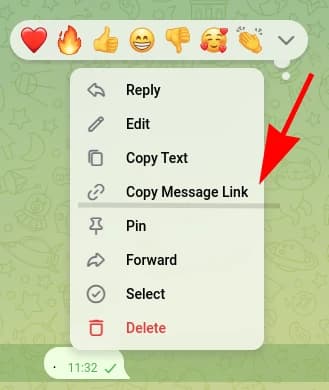
Private Groups and Channels
Private groups and channels use links that contain /c/:
https://t.me/c/123456789/42-
The numbers after
/c/represent the group or channel ID (e.g.,123456789). -
Important: For supergroups (groups with topics) and channels, you must add
-100in front of the number.Example: if the link shows
123456789, your chat ID is-100123456789. -
Extract the topic ID (if available):
https://t.me/c/123456789/12/987- The number in the middle of the URL (e.g.,
12) represents the topic ID.
- The number in the middle of the URL (e.g.,
Public Groups and Channels
Public groups and channels use a username in the link:
https://t.me/mygroup/42- These links do not show the numeric chat ID.
- If your target is a public group or channel, use Method 1 (Bot) above to get the chat ID.
🎉 Congratulations!
You’ve successfully obtained your chat ID. Now you can seamlessly forward messages between Discord and Telegram using ForwardMsg
What is Next?
Need Help?
Contact us: @forwardmsg_support
Email us: support@forwardmsg.com