 ForwardMsg
Come creare un bot Telegram
Per iniziare a inoltrare messaggi tra Discord e Telegram usando ForwardMsg, è necessario creare un bot Telegram. Questa guida la accompagnerà passo dopo passo.
🔴 Guarda un video tutorial 🎥
Creazione di un bot Telegram
Passaggio 1 - Avviare una chat con BotFather
BotFather BotFather è il bot ufficiale di Telegram per creare e gestire bot.
- Aprire Telegram e cercare
@BotFather.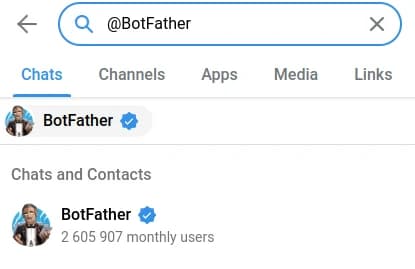
- Avviare una chat e digitare
/newbot.
Passaggio 2 - Configurare il proprio bot
- BotFather chiederà un nome per il suo bot.
- Scegliere un nome utente unico che termini con
bot(ad esempio,MyAwesomeBot). - Dopo aver completato la configurazione, BotFather fornirà un token del bot.
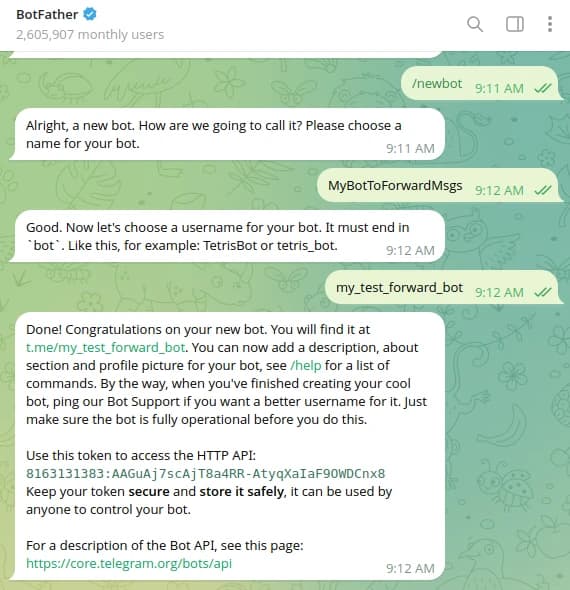
- Conservare questo token in modo sicuro, poiché è necessario per autenticare il suo bot.
🎉 Congratulazioni!
Ha creato con successo il suo bot Telegram. Ora può inoltrare senza problemi messaggi tra Discord e Telegram usando ForwardMsg.
Cosa fare dopo?
Serve aiuto?
Contattaci: @forwardmsg_support
Inviaci un'email: support@forwardmsg.com